Run Inference
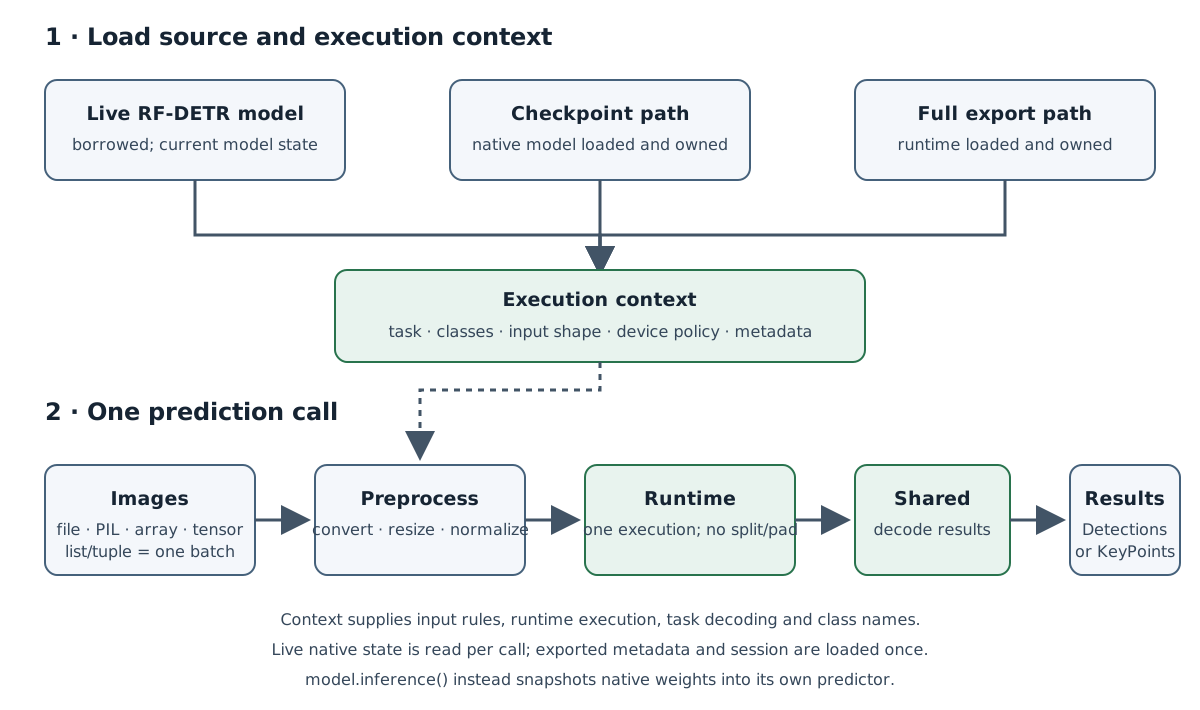
RFDETR.inference() creates an independent predictor for native model inference, while RFDETRInference gives live models, checkpoints, and supported full exports one shared image-prediction API. The native factory snapshots the current model weights and prediction settings; later training or source mutations do not affect that predictor. Both paths use one runtime call per image batch and return decoded Supervision outputs.
Choose a source
Use model.inference() when you want a predictor that owns an independent snapshot of a native model. It copies the current base weights, labels, normalization, and postprocessing settings once; subsequent training or source changes do not affect predictions or class names. Do not train or mutate the source concurrently with snapshot creation. Delete the predictor when finished to release its owned runtime. The source model remains unchanged.
from rfdetr import RFDETRSmall

model = RFDETRSmall()
predictor = model.inference()
results = predictor.predict("image.jpg")
A .pth, .pt, or .ckpt path passed to RFDETRInference loads and owns a native model; an exported path loads and owns its runtime. Checkpoint loading may require architecture information available from the checkpoint name or supplied to RFDETR.from_checkpoint(). For a CPU-safe native predictor, create the snapshot without compilation:
from rfdetr import RFDETR

model = RFDETR.from_checkpoint("checkpoint.pth", device="cpu")
predictor = model.inference(compile=False)
results = predictor.predict("image.jpg")
The native factory defaults to a captured CUDA graph (compile_backend="cudagraph") on CUDA, inductor compilation on Apple Silicon (MPS), when the installed PyTorch has its MPS code generator, and TorchScript compilation otherwise, batch size 1, and float32. Pass compile=False for a CPU-safe eager predictor. Compilation settings such as batch_size, dtype, and compile_backend belong to each returned predictor; the factory does not change the source model. The removed inplace keyword is rejected. remove_optimized_model() and is_optimized_inplace remain only for legacy model state and do not manage predictor lifetime.
Choose a fast route
model.inference() is the fast native route. RFDETRInference(model) and a .pth, .pt, or .ckpt path passed to RFDETRInference run the eager model, which is slower per image than a compiled predictor. For a checkpoint, load it with RFDETR.from_checkpoint() and call inference() on the result. On MPS, a checkpoint path passed to RFDETRInference takes the same model rewrites as inference() (see below); a live model never does.
On Apple Silicon, inference() compiles with inductor by default when the installed PyTorch has its MPS code generator, which can be faster than TorchScript; pass compile_backend="torchscript" to compare with your model, batch size and resolution. Inductor compilation takes several seconds the first time and runs again for each new input shape, so TorchScript can suit short runs better. A compiled predictor accepts only its compiled batch size, including for the last batch of a source. On an M4 Max, inference() with inductor (10.3 ms in fp16, 11.1 ms in fp32 at batch 1) and a Core ML export loaded with RFDETRInference (12.0 ms in fp32) are within two milliseconds of each other and nearly twice as fast as eager predict() (20.0 ms) and inference(compile_backend="torchscript") in fp32. Choose between them by deployment target rather than speed; whether fp16 or the Neural Engine helps a Core ML export depends on the model.
from pathlib import Path

from rfdetr import RFDETRSmall

model = RFDETRSmall(device="mps")
predictor = model.inference(batch_size=8)  # inductor, the default on MPS
images = sorted(Path("images").glob("*.jpg"))
images = images[: len(images) // 8 * 8]  # Whole batches only; predict the rest with a compile=False predictor.
if not images:
    raise ValueError("Need at least eight images for one compiled batch of 8.")
results = predictor.predict(images, batch=8)
On MPS, the predictor also samples the decoder's deformable attention with PyTorch's fused grid_sample and, for TorchScript and eager predictors, folds the backbone's LayerScale weights into the Linear layers before them. Only the predictor's copy of the model changes; at float32 its predictions match the source model's to float rounding, and in half precision they can differ by more.
On CUDA, inference() captures the predictor's forward pass into a CUDA graph by default and replays it on every call, which removes most of the kernel-launch cost that bounds small batches. The capture runs before inference() returns. It synchronizes the device and empties the process-wide CUDA caches, so build predictors before any serving threads start. If a capture fails, restart the process before trying another backend; compile_backend="torchscript" skips the capture.
For more CUDA throughput, export a TensorRT engine and load it with RFDETRInference. An engine exported with dynamic_batch=True and a max_batch_size runs a directory or glob in batches of up to eight without a batch argument, and so does any other export with a dynamic batch axis. ONNX Runtime with the CUDA execution provider (onnxruntime-gpu) also prepares its batches on the GPU and keeps them there.
With include_source_image=False, a directory, glob, manifest or batched list predicted on a CUDA device decodes its baseline color JPEG files on the GPU, one nvjpeg call per batch, instead of on CPU threads. The first file of each kind is checked against the CPU decoder, and a GPU that gives different pixels sends those files back to the CPU, so the model sees the same input either way. Not every GPU matches: a Tesla T4 differed for every kind and so keeps decoding on the CPU. Grayscale, CMYK, progressive and PNG files always decode on the CPU.
For the borrowed live-model behavior, construct RFDETRInference(model) directly. That facade reads the model's current state on every prediction, so it observes later training or optimization changes; configure the model's device and omit device, metadata, and runtime_options for this source. This mode does not promise safety when training mutates the model concurrently with prediction.
For export files, install the runtime extra for the target format and keep any .rfdetr.json sidecar beside its artifact. ONNX stores inference metadata in the model; other exported formats use the sidecar. For older exports, load the source checkpoint and call model.write_export_metadata(path, format=...) with the original export settings; without that checkpoint, supply missing inference semantics through metadata= as a JSON path or mapping. Sidecar metadata is checked against the artifact. notes do not replace task, classes, output, or preprocessing metadata. See Export Basics and its format guides for runtime installation and options.
from rfdetr import RFDETRSmall

model = RFDETRSmall(pretrain_weights="checkpoint.pth")  # The source checkpoint of this export.
model.write_export_metadata("output/model.xml", format="openvino")
Backbone-only artifacts contain features rather than predictions and cannot be loaded by this image-prediction API. LiteRT does not support full keypoint exports. The constructor accepts a trust_checkpoint option for checkpoints containing custom Python objects; enable it only for a checkpoint you trust.
Predict images
predict() accepts a file path (str or os.PathLike[str]), an HTTP(S) URL string, a PIL image, a NumPy array, a PyTorch tensor, or a list or tuple of these inputs. A list or tuple is one batch and returns one result per image. The runtime receives that batch in one execution; the API does not split or pad it. Each item must meet the source's channel, shape, and batch constraints.
HTTP(S) URL strings are downloaded with requests using a 30-second connect and read timeout, which does not bound the total download time. Redirects are followed, and the whole response body is read into memory with no size limit or host restriction. Pass only URLs you trust; for untrusted URLs, download and validate the image yourself and pass the decoded image instead.
PIL images and files are converted to the model's expected channels. For a one-channel model, a single-channel PIL image or file is converted to grayscale (L); for three-channel models, non-RGB PIL images are converted to RGB. NumPy arrays retain their supplied layout: use (H, W) or (H, W, 1) for one channel and (H, W, 3) for RGB. Tensor inputs use channel-first (C, H, W) and must already have the model's channel count. Floating-point arrays and all tensor inputs must have pixel values in [0, 1]; PIL images and uint8 NumPy arrays use [0, 255]. Tensors are image pixels before mean/std normalization, not already-preprocessed runtime batches.
With include_source_image=True (the default), predictions retain a writable uint8 source image: single-channel PIL/file inputs converted to L use (H, W), NumPy arrays keep (H, W) or (H, W, 1), and single-channel tensor inputs become (H, W, 1) after conversion from channel-first layout. RGB source images use (H, W, 3). source_image is stored in Detections.metadata; KeyPoints stores it per object in data. Convert grayscale to RGB explicitly before passing it to annotation code that expects three-channel color:
import numpy as np
import supervision as sv
from PIL import Image

from rfdetr import RFDETRInference

gray_predictor = RFDETRInference("output/grayscale.onnx")  # A one-channel detector.
with Image.open("gray.png") as image:
    gray = np.array(image.convert("L"))
detections = gray_predictor.predict(gray)
rgb = np.repeat(gray[..., None], 3, axis=2)
annotated = sv.BoxAnnotator().annotate(scene=rgb, detections=detections)
The output is supervision.Detections for detection and segmentation, or supervision.KeyPoints for keypoints. class_names returns the class names for the source. Prediction does not promise a particular accuracy or latency; those depend on the model, runtime, hardware, and settings.
Inspect runtime constraints
runtime_info is a fresh dictionary describing the selected backend, device policy, task, and shape/batch constraints. The constructor's device defaults to "auto"; for checkpoint paths "auto" leaves device selection to native checkpoint loading, while an explicit device is forwarded. Export paths accept the device values supported by their runtime. An unsupported device is refused. The device field reports a policy or selected runtime device; vendor runtimes may choose a physical device internally. See the Inference API Reference for format-specific device values.
| Field | Meaning |
|---|---|
backend, device |
Runtime and its device policy or selected device. |
task |
detect, segment, or keypoints. |
input_shape |
Canonical NCHW shape; None marks a dynamic axis. |
default_shape |
Default image height and width as (H, W). |
batch_size |
Exact required batch size, or None when not fixed. |
max_batch_size |
Batch upper bound, or None when unbounded by the source. |
Eager native models accept dynamic spatial dimensions and batch sizes. A native predictor returned by model.inference() fixes its spatial dimensions and reports an exact batch_size after compilation. Exported artifacts report their own fixed or dynamic axes and batch limits. A fixed batch requires exactly that many images; a maximum permits smaller batches down to one. Invalid shapes or batches fail before runtime execution.
By default, preprocessing resizes to default_shape. Pass shape=(height, width) to override it where the source allows. Each dimension must be positive and divisible by patch_size * num_windows; fixed-shape artifacts require their exported dimensions. patch_size is an advanced validation override, not a way to change the backbone: it must be a positive integer matching the model's configured patch size. Omit it to use the configured value.
from pathlib import Path

from rfdetr import RFDETRInference

predictor = RFDETRInference("output/model.onnx")
print(predictor.class_names)
print(predictor.runtime_info)
results = predictor.predict(Path("image.jpg"), threshold=0.4)
antialias=None (the default) uses the artifact metadata's resize_antialias for exported sources and False for native sources. Pass antialias=True or antialias=False to override it and match the checkpoint's training resize. New exports record resize_antialias=False because training-time resize settings are not stored; for older artifacts without metadata, metadata= can supply resize_antialias=True.
The public prediction keywords are threshold, shape, patch_size, include_source_image, and antialias. Unknown keywords raise TypeError before model execution. Constructor-only settings are device, metadata, trust_checkpoint, and runtime_options; runtime options are export-format-specific and reject unknown keys. See the runtime options table and the format guides.